
How To Update Apple Developer Program License Agreements
Apple periodically updates its Apple Developer Program License Agreement, and these updates must be accepted before any new apps or app updates can be released.
Because Apple requires the Account Holder to accept these terms, we are unable to do this on your behalf.
This comes up frequently, so we’ve created this quick guide to help you get it done smoothly.
Go to the Apple Developer website:
Sign in with your Apple ID.
- Important: You must log in as the Account Holder. No other role can review or accept these agreements.
Look for a banner at the top of the page prompting you to Review Agreement.
Click the banner to open the updated terms.
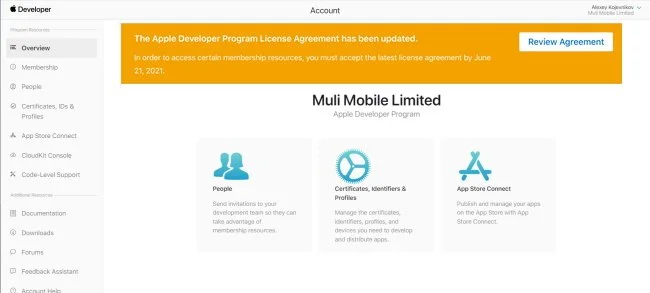
Review the agreement, check the confirmation box, and click I Agree to finalize.
If You Don’t See the Banner
Sometimes the banner won’t appear even if action is required. To bypass this:
Navigate directly to Agreements, Tax, and Banking in your Apple Developer account.
Any outstanding agreements or required updates will always be listed there.
Additional Help
Apple provides its own step-by-step guide here:
https://help.apple.com/app-store-connect/?lang=en#/deva001f4a14
If you run into any issues or aren’t sure whether the agreement has been accepted, feel free to reach out to our support team and we’ll help you verify!
What if I don't see the banner?
Sometimes the banner may not display correctly. In this case, try accessing the "Agreements, Tax, and Banking" page directly through your Apple Developer account. Any important updates or approvals will always be shown on that screen.
Click here to access Apple's step-by-step instructions on how to find and accept these agreements.
Still need help?
Our support team is here for you.